Transform Any Room Into a Productive Work Space That Actually Works
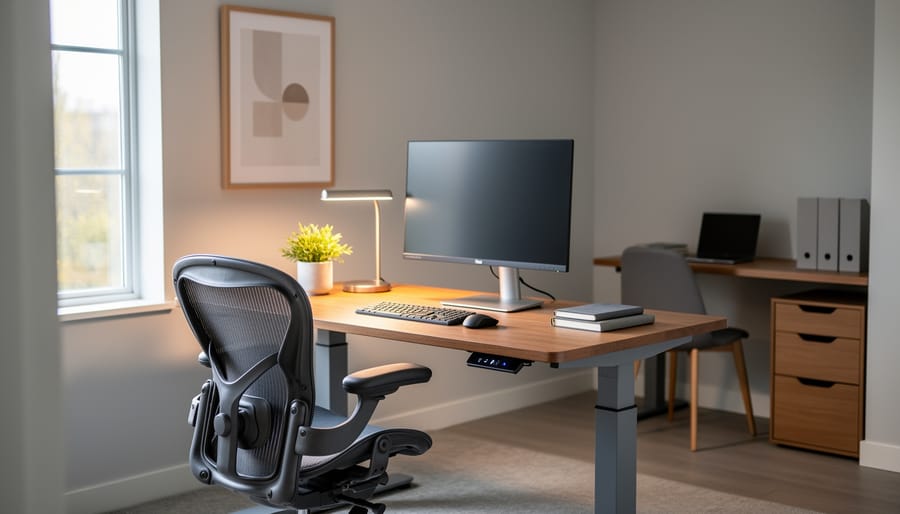
Choose a room with natural light and a door you can close—your productivity depends on minimizing distractions and maximizing focus. Position your desk perpendicular to windows rather than facing them directly to reduce screen glare while still benefiting from daylight that reduces eye strain and boosts mood.
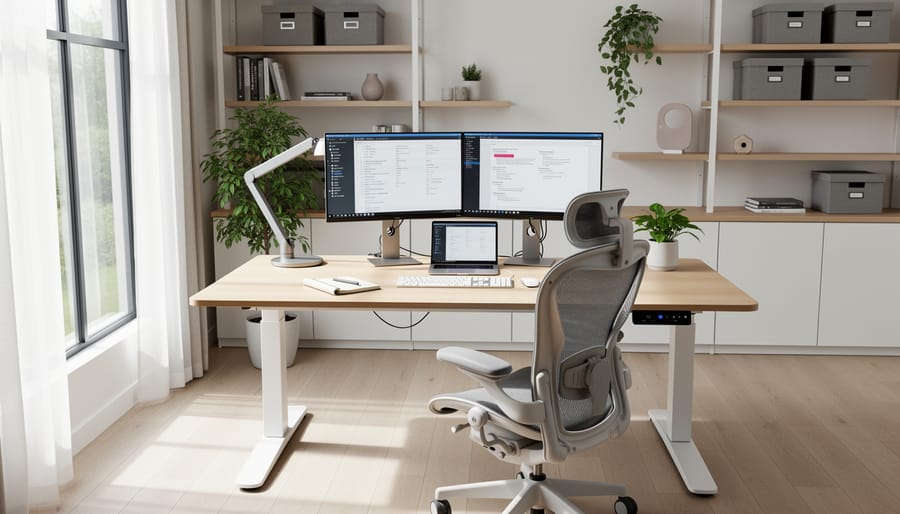
Invest in an adjustable chair and desk combination that allows you to alternate between sitting and standing throughout your workday. Your chair should support your lower back with armrests at elbow height, while your monitor sits at eye level approximately an arm’s length away. This ergonomic foundation prevents the chronic pain and fatigue that plague home office workers.
Install dedicated electrical circuits with surge-protected outlets positioned strategically around your workspace to accommodate computers, printers, lighting, and charging stations without creating cable chaos. Run cables through desk grommets or wall-mounted channels to maintain a clean, professional appearance that keeps your mind clear and focused.
Create distinct zones within your work room even in compact spaces—designate separate areas for computer work, phone calls, filing, and creative tasks. This spatial organization helps your brain shift between different types of work more efficiently and prevents the blurred boundaries that make working from home feel overwhelming.
Layer your lighting with overhead fixtures, task lighting at your desk, and ambient options for video calls. Proper illumination reduces headaches and eye fatigue while ensuring you look professional during virtual meetings. Adding personal touches like plants, artwork, or a specific color scheme transforms a functional workspace into an environment where you actually want to spend your workday.
What Makes a Work Room Different from a Home Office?
While the terms are sometimes used interchangeably, work rooms and home offices have distinct characteristics that set them apart. Understanding these differences can help you create a space that truly fits your lifestyle and work needs.
A traditional home office typically serves one primary function: professional work. It’s usually designed with a single desk setup, standard office furniture, and a layout focused on individual productivity. Think of the classic study with built-in bookshelves and a large wooden desk.
Work rooms, on the other hand, embrace flexibility and adaptability. They’re designed to accommodate multiple activities and work styles within the same space. You might use your work room for remote work during the day, creative hobbies in the evening, and weekend DIY projects. This versatility makes work rooms ideal for households where space is at a premium or where family members have diverse needs.
The furniture in a work room tends to be more modular and movable compared to the heavier, permanent fixtures often found in traditional offices. Rolling carts, folding tables, and multi-functional storage solutions allow you to reconfigure the space based on current projects. This approach works especially well if you’re a DIY enthusiast who needs room for crafting supplies, tools, or materials alongside your computer and paperwork.
Technology integration also differs between the two. While a home office might have a desktop computer and printer, work rooms often incorporate various tech tools depending on the tasks at hand. You might include a laptop docking station for easy transitions between work and personal projects, or set up multiple charging stations to accommodate tablets, phones, and other devices used throughout the day.
The key advantage of work rooms is their ability to grow and change with your needs, making them a smart long-term investment for modern households.
Choosing the Right Room for Your Work Space
Spare Bedrooms and Bonus Rooms
Spare bedrooms are among the most popular underutilized spaces in modern homes, making them ideal candidates for conversion into dedicated work rooms. The key advantage is the existing infrastructure – you already have walls, doors, electrical outlets, and often a closet for storage. This eliminates major construction costs while providing the privacy and separation that home offices need.
Before converting a guest bedroom, consider how often you actually host overnight visitors. Many homeowners find that a quality sleeper sofa or Murphy bed can serve dual purposes, maintaining guest accommodations while creating functional workspace. Bonus rooms above garages offer excellent sound isolation, keeping work noise away from family areas. Just check insulation levels, as these spaces can run hot in summer or cold in winter, potentially requiring upgrades for year-round comfort.
Basement and Attic Conversions
Basements and attics offer fantastic opportunities to create dedicated work rooms, but they come with unique considerations. Below-grade spaces often struggle with natural light and moisture, so invest in bright LED lighting that mimics daylight and consider adding a dehumidifier to protect electronics and paperwork. If your basement has small windows, maximize them with mirrors and light-colored walls to bounce illumination around the space. Insulation is key for maintaining comfortable temperatures year-round.
Attic conversions present different challenges. Heat rises, making proper ventilation essential during warmer months. Installing a ceiling fan or mini-split AC system can make these spaces comfortable. Check that your attic floor can support the weight of furniture and equipment before converting. Sloped ceilings can actually create cozy work nooks, but ensure you have adequate headroom at your desk area. Both spaces benefit from egress considerations for safety and may require electrical upgrades to handle your technology needs. The privacy and separation these locations provide often outweigh the extra planning required.
Shared Spaces and Room Dividers
When a dedicated home office isn’t an option, you can still create an effective work room within shared living areas. Room dividers offer practical solutions for establishing boundaries without major renovations. Folding screens, bookcases, and curtain systems work beautifully to separate your workspace from the rest of the room while maintaining flexibility.
Consider positioning a desk behind a sofa or using a large bookshelf as a dual-purpose divider that provides both separation and storage. These approaches transform awkward spaces into productive work zones. For dining room conversions, select furniture that transitions easily between work and meal times. A simple credenza can hide office supplies when you’re hosting dinner guests.
Wall-mounted desks that fold away offer another smart solution for tight quarters. Install one in a corner of your living room, and you’ll have a work surface that disappears when the workday ends. Pair it with floating shelves above for essential storage without eating up floor space.
Essential Furniture for Maximum Productivity
Desk Selection: Size, Style, and Functionality
Start by measuring your available space to determine what desk size will fit comfortably while leaving room for movement. A standard desk measures 48-60 inches wide and 24-30 inches deep, but compact L-shaped or corner desks maximize smaller rooms. Consider your daily tasks when selecting functionality. If you work with multiple monitors, choose a desk at least 60 inches wide with built-in cable management. For paper-heavy work, prioritize desks with drawers and filing systems.
Match your desk style to your room’s aesthetic. Modern minimalist desks with clean lines suit contemporary spaces, while wooden executive desks complement traditional interiors. Adjustable standing desks offer health benefits and versatility, though they require higher budgets.
Think about surface material too. Laminate desks are budget-friendly and easy to clean, solid wood provides durability and warmth, and glass creates an airy feel but shows fingerprints easily. Test desk height before purchasing, ensuring your elbows rest at 90 degrees when typing. This simple check prevents long-term discomfort and maintains productivity throughout your workday.
The Chair That Won’t Kill Your Back
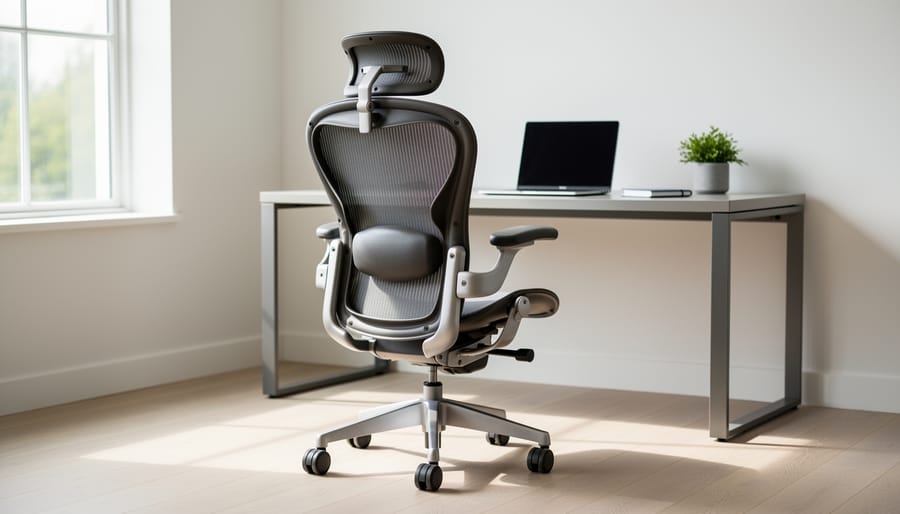
Your chair is where you’ll spend most of your workday, so getting this right matters more than almost any other furniture choice. Look for adjustable lumbar support that curves to fit your lower back, armrests that adjust in height and width, and a seat depth that lets you sit with your feet flat on the floor while leaving a few inches between the seat edge and the back of your knees.
A quality ergonomic chair doesn’t have to drain your budget. Solid options start around $200-300, offering adjustable features without the $1,000+ price tag. Try before you buy when possible, or check return policies for online purchases. Key features to prioritize include breathable mesh backing for air circulation, a tilt mechanism that lets you rock slightly while working, and a weight capacity that exceeds your needs by at least 50 pounds for longevity. If you’re working with a tight budget, consider certified refurbished office chairs from major brands, which often cost half the price of new models while maintaining the same ergonomic benefits.
Storage Solutions That Actually Work
The right storage can transform a cluttered work room into a productivity powerhouse. Start with vertical thinking—wall-mounted shelving units maximize floor space while keeping essentials within arm’s reach. Floating shelves work beautifully for books and decorative items, while adjustable shelving systems adapt as your needs change.
Filing cabinets aren’t just for offices anymore. Modern designs blend seamlessly with home décor and provide crucial document organization. Choose two-drawer versions for compact spaces or go lateral for easier access to frequently used files.
Consider multi-purpose furniture that pulls double duty. Ottoman storage benches offer seating plus hidden compartments, while desks with built-in drawers eliminate the need for separate storage pieces.
Don’t overlook behind-the-door organizers and pegboards—these simple solutions create instant storage without eating up valuable square footage. The key is choosing organized storage solutions that match your workflow, keeping frequently used items accessible while tucking away occasional supplies.
Technology Integration for Modern Work Rooms
Internet and Connectivity Setup
A reliable internet connection is the backbone of any productive work room. Start by positioning your router strategically—ideally in a central location on the same floor as your workspace. If your work room is far from the router, consider installing a mesh Wi-Fi system. These multi-unit systems create a seamless network throughout your home, eliminating dead zones and ensuring consistent speeds wherever you’re working.
For the most stable connection, especially if you’re handling large files or video conferencing frequently, run an ethernet cable directly to your desk. This DIY project is simpler than it sounds: purchase CAT6 ethernet cable, fish it through walls or use cable raceways along baseboards for a clean look. Ethernet delivers faster, more reliable speeds than Wi-Fi and won’t suffer from interference.
Test your connection speed before finalizing your setup using free online tools. Aim for at least 25 Mbps download speed for basic tasks, or 100+ Mbps if you’re streaming, video calling, or uploading content regularly. Position your desk near ethernet ports or power outlets to minimize cable clutter and maintain a professional appearance in your dedicated workspace.
Power and Cable Management
A tangle of cables and overloaded power strips can quickly turn your work room into a chaotic mess. Start by mapping out your power needs before adding outlets. If you’re comfortable with basic electrical work, installing a new outlet is surprisingly straightforward, though you should always follow local electrical codes or hire a licensed electrician for complex installations.
For immediate improvements, invest in a desk with built-in cable management channels or add adhesive cable clips under your desktop to route cords neatly. Power strips with mounting brackets can attach underneath your desk, keeping them accessible yet out of sight. Use velcro cable ties or reusable zip ties to bundle similar cables together, which makes adjustments easier than permanent solutions.
Hide visible cables by running them along baseboards using paintable cord covers that blend with your walls. For a truly clean look, consider drilling a small hole through your desktop near the back edge to feed cables through, or use a desk grommet for a polished finish. Label each cable at both ends with color-coded tags or a label maker to simplify troubleshooting and prevent accidentally unplugging the wrong device during reorganization.
Smart Device Integration
Transform your work room into a smart workspace with devices that adapt to your needs throughout the day. Start with smart lighting systems like Philips Hue or LIFX bulbs that let you adjust brightness and color temperature based on your tasks. Cooler tones boost focus during morning hours, while warmer hues reduce eye strain in the evening.
A smart thermostat maintains your ideal working temperature automatically, learning your schedule to optimize comfort and energy savings. The Nest or Ecobee models integrate seamlessly with most HVAC systems and can be controlled remotely.
Voice assistants like Amazon Alexa or Google Assistant serve as hands-free productivity tools. Set timers for breaks, manage your calendar, control your lighting, or play background music without interrupting your workflow. Position your smart speaker within easy voice range but away from video call backgrounds to minimize visual clutter.
Most smart devices connect through a central hub or your existing Wi-Fi network, making installation straightforward for DIY enthusiasts. Begin with one or two devices and expand your system as you discover which features enhance your productivity most.
Lighting Your Work Room Right
Getting your work room lighting right can make the difference between productive workdays and eye strain headaches. The key is creating layers of light that work together throughout the day.
Start with natural light as your foundation. Position your desk perpendicular to windows rather than facing them directly, which reduces screen glare while still benefiting from daylight. If you’re lucky enough to have abundant natural light, use sheer curtains or adjustable blinds to control brightness during peak sun hours.
For artificial lighting, think in three layers. Ambient lighting provides overall illumination for the room. A ceiling fixture with a dimmer switch gives you flexibility to adjust brightness based on time of day and task. Look for LED bulbs in the 3000-4000K range, which offer a neutral white light that won’t tire your eyes.
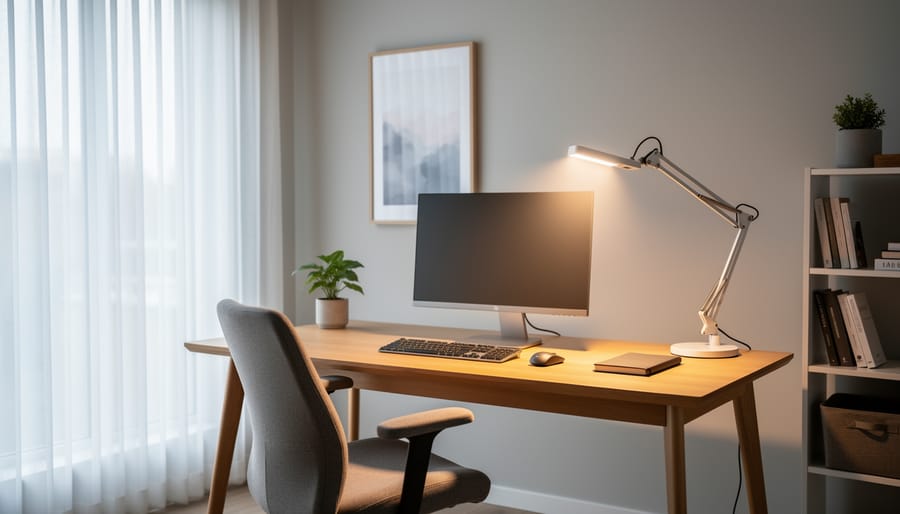
Task lighting is your productivity powerhouse. A quality desk lamp with adjustable height and direction lets you focus light exactly where you need it. Choose lamps with at least 450 lumens for reading and detailed work. Many modern options include USB charging ports, adding functionality to your workspace.
Accent lighting fills in shadows and adds warmth. Consider wall sconces, floor lamps in corners, or LED strip lights under shelving to eliminate harsh contrasts that cause eye fatigue.
For rooms with limited natural light, don’t despair. Full-spectrum LED panels can mimic daylight and mount easily on ceilings or walls. This simple DIY installation involves basic wiring or plug-in options that brighten even the dreariest basement office. Smart bulbs offer another tech-savvy solution, allowing you to program lighting schedules that match your circadian rhythm and boost alertness when you need it most.
Interior Design Elements That Boost Focus
The colors, textures, and visual elements you choose for your work room directly impact your ability to concentrate and produce quality work. Let’s explore design choices backed by research that create a productive environment without making your space feel sterile or boring.
Start with your wall color, as it sets the foundation for everything else. Blues and greens are your productivity powerhouses, with studies showing they reduce eye strain and promote calm focus. If you’re in a creative field, consider adding an accent wall in a warmer tone like terracotta or soft yellow to stimulate innovative thinking. Avoid bright reds and oranges on large surfaces, as they can increase stress levels during long work sessions.
For a quick DIY refresh, try a two-tone wall treatment. Paint the lower third of your walls in a grounding neutral like warm gray, and the upper portion in a soft sage or powder blue. This creates visual interest while maintaining the calming effect needed for concentration. You’ll need painter’s tape, a level, and about four hours for a standard 10×10 room.
Window treatments deserve special attention since natural light affects both mood and productivity. Cellular shades or adjustable blinds give you control throughout the day. Position your desk perpendicular to windows when possible to minimize glare on screens while still benefiting from daylight. Add sheer curtains behind blackout options for flexibility during video calls or when you need to reduce visual distractions from outside.
Decorative elements should follow the rule of intentional minimalism. Display three to five meaningful items that inspire you rather than cluttering surfaces with knickknacks. A single large piece of artwork creates a focal point without overwhelming your visual field. Incorporate live plants like pothos or snake plants, which improve air quality and add organic shapes that soften the space.
Technology integration tip: Use smart bulbs that adjust color temperature throughout the day, shifting from energizing cool white in the morning to warmer tones in the afternoon, supporting your natural circadian rhythm while you work.
DIY Projects to Upgrade Your Work Room
Ready to roll up your sleeves? These DIY weekend projects will transform your work room without breaking the bank. Let’s dive into three practical upgrades you can tackle in a day or two.
Project 1: Custom Desktop Organizer
Start by measuring your desk space and deciding what items need homes—pens, notepads, charging cables, or business cards. Purchase a sheet of 1/2-inch plywood from your local hardware store, along with wood glue and sandpaper. Cut the plywood into sections: a base piece (12×8 inches works well), vertical dividers (varying heights from 3-6 inches), and compartment walls. Sand all edges smooth to prevent splinters. Arrange your dividers on the base to create compartments sized for your specific needs. Apply wood glue to attach the pieces, using small clamps or heavy books to hold them in place while drying overnight. Once dry, paint or stain the organizer to match your work room aesthetic. Add cork board backing to one section for pinning important notes, and you’ve got a personalized organization system that costs under twenty dollars.
Project 2: Installing Floating Shelves
Floating shelves maximize vertical space while keeping your work surface clear. Purchase hollow-core floating shelf kits that include mounting brackets. Use a stud finder to locate wall studs for the strongest installation. Mark your desired shelf height with a level, ensuring perfect alignment. Drill pilot holes into the studs, then secure the mounting brackets with heavy-duty screws. Slide the hollow shelf onto the brackets until it sits flush against the wall. For shelves between studs, use heavy-duty drywall anchors rated for at least 50 pounds. Install multiple shelves at varying heights to create visual interest while providing storage for books, supplies, and decorative items that inspire productivity.
Project 3: Cable Management System
Tame the wire chaos with this simple solution. Gather cable clips, velcro ties, and a cable sleeve or raceway from any office supply store. First, unplug everything and untangle all cords. Group cables by device, then bundle each group with velcro ties, leaving enough slack for movement. Mount cable clips along the back edge of your desk or down table legs to guide cords neatly. For areas with multiple cables running together, thread them through a cable sleeve for a cleaner look. Label each cable near the plug using small tags or colored tape so you’ll never wonder which cord belongs to what device.
Creating an effective work room doesn’t have to happen overnight. Start with the basics – a comfortable chair, proper lighting, and a clutter-free desk – then build from there as your needs and budget allow. Even small changes, like repositioning your desk to capture natural light or adding a simple pegboard organizer, can make a significant difference in your productivity and comfort.
Remember, your work room should evolve with you. What works today might need tweaking tomorrow, and that’s perfectly normal. Don’t be afraid to experiment with different layouts, test new organizational systems, or try that DIY project you’ve been eyeing. The goal is to create a space that supports your unique work style and keeps you motivated throughout the day.
Looking for more inspiration to transform other areas of your home? Our Room-by-Room Guide series offers practical tips for every space, from optimizing study nooks to creating multipurpose areas that serve your entire household. Your ideal work room is within reach – start small, stay focused, and enjoy the process of making it your own.