Transform Your Home Office with These 5S Desk Organization Methods
Transform your cluttered workspace into a productivity powerhouse by applying the 5S methodology—Sort, Set in Order, Shine, Standardize, and Sustain—to create a desk that eliminates distractions and maximizes efficiency. If you’re struggling with papers scattered across your workspace, cables tangling beneath your monitor, or supplies you can’t find when you need them, these proven 5S desk examples will show you exactly how to organize every inch of your work surface. This Japanese organizational system, originally developed for manufacturing, translates perfectly to home offices where every square inch matters.
The beauty of 5S lies in its simplicity: remove what you don’t need, assign a specific place for everything you keep, maintain cleanliness, create repeatable systems, and build habits that stick. Whether you work from home full-time or need a dedicated space for managing household tasks, implementing 5S principles will improve your home office functionality while creating a calming environment that supports focused work. The real-world desk setups ahead demonstrate how minimalism meets practicality, proving you don’t need expensive furniture or elaborate systems to achieve professional-grade organization that actually works in daily life.
What Is the 5S Method and Why Use It for Your Desk?
The 5S method is a powerful organizational system that originated in post-war Japan, developed by Toyota as part of their lean manufacturing process. While it started on factory floors, this approach works wonders for home offices too. The name comes from five Japanese words that each start with “S”: Seiri (Sort), Seiton (Set in Order), Seiso (Shine), Seiketsu (Standardize), and Shitsuke (Sustain).
Here’s how each step works for your desk:
Sort means removing everything you don’t actually need. Go through your desk and get rid of old papers, duplicate supplies, and items that belong elsewhere. If you haven’t used something in three months, it probably doesn’t deserve prime desk real estate.
Set in Order involves giving everything that remains a designated home. Your stapler, pens, notebooks, and charging cables should each have a specific spot where they always live.
Shine is about cleaning and maintaining your workspace. A quick daily wipe-down keeps your desk inviting and helps you spot potential issues before they become problems.
Standardize means creating routines and systems that make organization automatic. Label your drawers, use matching containers, and establish consistent filing methods.
Sustain is the commitment to maintaining these habits long-term through regular reviews and adjustments.
Why bother with all this? The benefits are substantial. A 5S desk reduces the mental clutter that drains your energy throughout the day. You’ll spend less time hunting for supplies and more time actually working. Studies show organized workspaces can boost productivity by up to 25 percent while significantly reducing stress levels. When everything has its place, your mind is free to focus on what actually matters, whether that’s closing deals, creative projects, or tackling your to-do list.

The Five Steps of 5S Desk Organization
Sort (Seiri): Clear the Clutter
Start by removing everything from your desk and asking yourself one simple question: “Have I used this in the past month?” This straightforward approach helps you quickly identify what truly belongs in your workspace.
Essential items are the tools you reach for daily. Think your computer, phone charger, a pen or two, current project files, and maybe your favorite coffee mug. These items directly support your work and deserve a permanent spot on your desk.
Non-essential items are trickier because they feel important but rarely get used. Old sticky notes with outdated reminders, decorative items you’ve stopped noticing, duplicate supplies like five staplers, business cards from people you’ll never contact, and those “just in case” cables for devices you no longer own—these are prime candidates for removal.
Create three sorting zones: Keep (daily use), Relocate (useful but belongs elsewhere like a filing cabinet or supply closet), and Discard (broken, outdated, or truly unnecessary). Be honest with yourself during this process. If something hasn’t been touched in weeks, it’s probably safe to move it off your primary workspace. Remember, the goal isn’t a bare desk but rather a purposeful one where every item earns its place through regular use.
Set in Order (Seiton): Everything Has Its Place
Once you’ve sorted and purged, it’s time to give everything a permanent home. Think of your desk in zones based on how often you reach for items. Your primary zone, within arm’s reach, should house daily essentials like your keyboard, mouse, notepad, and frequently used pens. Secondary items like staplers or reference materials belong just outside this circle, perhaps in desk drawers or a nearby shelf.
Consider ergonomic placement when organizing your workspace. Your monitor should sit at eye level, about an arm’s length away, while your keyboard and mouse stay aligned with your elbows at 90 degrees. Use drawer dividers, desktop organizers, and labeled containers to maintain clear boundaries for each item category.
A simple DIY tip: trace your frequently used items on paper or use painter’s tape to mark their spots. This visual reminder helps you return everything to its designated location after use, making the system sustainable long-term.
Shine (Seiso): Keep It Clean
A clean workspace isn’t just about appearances—it directly impacts your productivity and mental clarity. The Shine step transforms cleaning from an occasional chore into a simple daily habit that takes just minutes.
Start with a quick daily routine: wipe down your desk surface at the end of each workday, dust your monitor and keyboard, and check for any spills or smudges. Keep cleaning wipes in your desk drawer for easy access. This five-minute ritual prevents dust buildup and keeps your workspace inviting for the next morning.
For weekly maintenance, go deeper. Clean your keyboard with compressed air, wipe down cables and equipment, and sanitize frequently-touched items like your mouse and phone. Check under your desk for forgotten items or tangled cords.
Here’s a simple tech integration tip: set a recurring calendar reminder on Friday afternoons labeled “Desk Shine Time.” This gentle nudge ensures the habit sticks. You can also use your smartphone to photograph your clean desk each week—it’s motivating to see your progress and helps you spot areas needing extra attention.
Remember, a clean desk is easier to organize and maintain, making the entire 5S system work smoothly together.
Standardize (Seiketsu): Create Consistent Systems
Now it’s time to make your organized desk sustainable. Standardization means creating systems that anyone (including future you) can follow without thinking twice. Start by taking photos of your newly organized desk setup. Print these images and keep them visible as a reference point for how your workspace should look. Color-coding is your best friend here—assign specific colors to different categories like red folders for urgent items and blue for reference materials. Label everything using a consistent format, whether that’s a label maker or printed tags with the same font and size. Create a simple checklist that outlines your daily desk reset routine, such as “file papers, return pens to holder, clear coffee mug.” Consider using drawer dividers or desk organizers in matching styles to create visual harmony. The goal is making maintenance so straightforward that keeping your desk organized becomes effortless rather than a chore requiring constant decision-making.
Sustain (Shitsuke): Make It a Habit
The real magic of 5S happens when it becomes second nature rather than a chore you have to remember. Start by scheduling quick five-minute desk resets at the end of each day to put everything back in its designated spot. Set a calendar reminder if needed until it becomes automatic.
Create a simple monthly audit checklist to review your system. Ask yourself: Are items still in the right places? Is anything accumulating that shouldn’t be there? Does your setup still work for your current projects? This regular check-in prevents gradual decline.
Make it social by sharing your 5S journey with coworkers or family members who share your space. When everyone participates, accountability increases and the system sticks. Take before-and-after photos to remind yourself of the progress you’ve made when motivation dips.
Consider using technology to support your habits. Set phone reminders for weekly supply checks or use productivity apps that prompt you to tidy up. The key is building these practices into your existing routine until maintaining your organized desk feels effortless and natural.
5 Real-World 5S Office Desk Examples
The Minimalist Tech Workspace
For programmers and digital workers, a minimalist tech workspace embodies the 5S principles beautifully. This setup starts with a single large monitor or dual-monitor arrangement on sturdy monitor arms, freeing up valuable desk surface area. All cables run through a cable management sleeve or raceway mounted beneath the desk, creating a clutter-free appearance that supports the Sort and Set in Order principles.
The desk surface itself holds only daily essentials: a wireless keyboard, mouse, and perhaps a single notebook. A small desk pad defines the work zone and protects the surface. Behind the monitors, a minimal desk organizer corrals pens and USB drives. The laptop sits on a vertical stand when not in use, maintaining the Shine principle by preventing dust accumulation.
Under-desk CPU holders or laptop docking stations keep technology accessible yet invisible. A single task light with adjustable brightness reduces eye strain during long coding sessions. The key is maintaining clear zones: a defined keyboard area, monitor placement at eye level, and everything else stored in desk drawers or wall-mounted organizers. This streamlined approach eliminates visual distractions, helping developers maintain focus during complex problem-solving tasks while making daily cleaning a simple five-minute routine.

The Creative Professional’s Organized Chaos
Creative professionals face a unique challenge: how do you stay organized without killing your inspiration? This setup proves you can have both. Start with a pegboard mounted above your desk to display color swatches, mood boards, and frequently-used tools. Everything stays visible yet organized, satisfying both the Sort and Set in Order principles.
Install a three-drawer rolling cart beside your desk as your supply station. The top drawer holds daily essentials like pencils and markers, the middle drawer stores specialty supplies, and the bottom drawer keeps backup materials. Label each drawer clearly so you always know what’s inside and what needs restocking.
Use desk drawer organizers to create dedicated spots for different tool categories. Group pens separately from markers, keep tape and adhesives together, and designate a specific space for measurement tools. This prevents the dreaded junk drawer effect while keeping everything within arm’s reach.
Schedule a quick five-minute cleanup each Friday afternoon to straighten your pegboard, wipe down surfaces, and return supplies to their homes. This ritual maintains your creative flow throughout the week while ensuring your workspace stays functional and inspiring.
The Multi-Purpose Family Desk
When multiple family members share a workspace, organization becomes even more critical. A well-executed multi-purpose family desk demonstrates the 5S principles at their best, allowing seamless transitions between different users throughout the day.
The key to this setup lies in modular storage solutions. Install a pegboard or wall-mounted rail system where each family member has their designated zone with color-coded containers. Label everything clearly using a label maker or printed tags, specifying whose supplies belong where. This eliminates confusion and keeps the Sort phase maintained daily.
For quick transitions, use rolling carts or portable caddies that each person can pull out when it’s their turn at the desk. Dad’s work documents stay in his caddy, the kids’ homework supplies in theirs, and mom’s craft materials in another. When someone finishes, they simply roll their cart away, leaving a clean surface for the next user.
Create a simple end-of-session checklist posted at eye level: clear the desktop, return items to labeled spots, wipe down the surface, and push in the chair. This Sustain step takes just two minutes but prevents clutter accumulation and ensures everyone respects the shared space.
The Small Space Solution
Working with a compact corner desk or fold-down workstation doesn’t mean sacrificing organization. In fact, applying 5S principles becomes even more critical when space is limited. This small space solution demonstrates how thoughtful organization maximizes every inch.
Start by sorting ruthlessly. Keep only essentials within arm’s reach. Install floating shelves above your desk to capitalize on vertical real estate for frequently used items like notebooks and reference materials. A pegboard mounted on the wall provides customizable storage that adapts as your needs change.
Multi-functional furniture is your best friend here. Choose a desk with built-in drawers or attach a slim rolling cart underneath that slides out when needed. Use drawer dividers to maintain order and assign specific homes for supplies. Label shelf edges clearly so everything returns to its designated spot.
A fold-down desk works beautifully for tight spaces. When implementing 5S, mount magnetic strips inside the desk panel for scissors and small tools, and use adhesive hooks for headphones or charging cables. This setup stays tidy because clutter simply can’t accumulate when your workspace literally folds away.
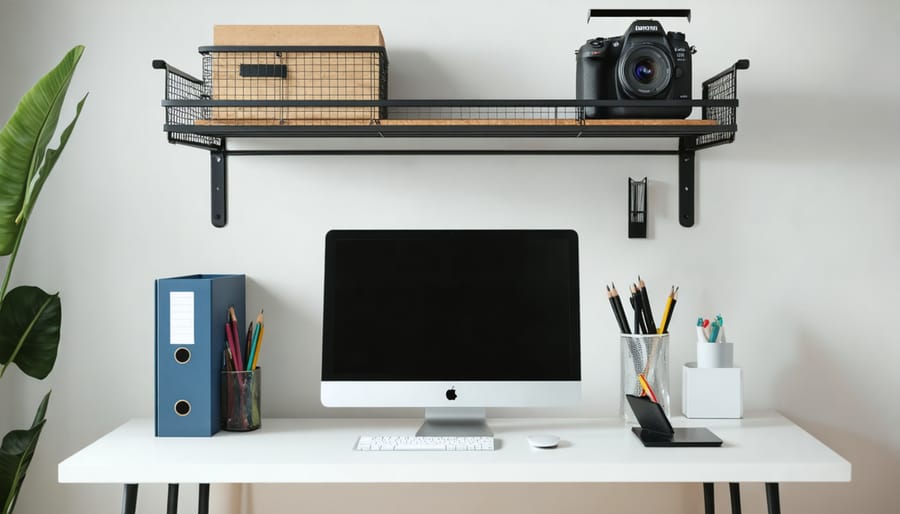
The Executive Home Office
For professionals who take video calls and meet with clients from home, the executive setup demonstrates 5S principles at their finest. Start with Sort by keeping only current client files and essential reference materials within arm’s reach. Everything else gets archived in closed cabinets to maintain that polished appearance on camera.
Set in Order becomes crucial here. Install a sophisticated filing system with labeled drawers for contracts, invoices, and project documents. Use matching desktop organizers for pens, business cards, and office supplies. Position your monitor and keyboard at ergonomic heights while ensuring your video call background looks intentional and professional.
The Shine element extends beyond cleaning to presentation. Polish wood surfaces regularly, manage cable clutter with under-desk channels, and maintain a consistent color scheme. Standardize with dedicated zones for daily tasks, client materials, and personal items. Keep chargers and tech accessories hidden in drawer organizers or decorative boxes. Finally, Sustain the system by spending five minutes at day’s end returning items to their designated spots, filing loose papers, and preparing your space for the next workday. This routine ensures you’re always camera-ready for unexpected calls while maintaining productivity through organized efficiency.
Essential Tools and Furniture for Your 5S Desk Setup
Setting up your 5S desk doesn’t require a complete overhaul or expensive purchases. With the right tools and furniture, you can create an organized workspace that actually stays tidy. Here’s what you need to get started.
Start with drawer dividers and desk organizers to establish dedicated spaces for everything. Adjustable drawer organizers work best since they adapt to your specific needs, whether you’re storing pens, paper clips, or charging cables. Look for stackable desktop organizers that maximize vertical space while keeping frequently used items within arm’s reach.
Cable management is where most desks fall apart visually. Invest in cable clips, sleeves, or under-desk cable trays to wrangle those cords. Simple velcro cable ties are game-changers for keeping chargers bundled and labeled. For a DIY approach, you can even use binder clips attached to your desk edge to hold cables in place.
Storage furniture should complement your workflow. Filing cabinets with labeled folders support the Sort and Set in Order phases, while a small bookshelf nearby keeps reference materials accessible but off your desk surface. Choose furniture with clean lines and minimal visual clutter.
Don’t overlook tech accessories that support organization. A monitor stand with built-in storage creates space underneath for notebooks or keyboards. USB hubs keep connections centralized, and a good desk lamp reduces eye strain while illuminating your organized workspace. Label makers might seem old-school, but they’re essential for the Standardize phase, ensuring everything has a clearly marked home.
Common 5S Desk Mistakes and How to Avoid Them
Even with the best intentions, it’s easy to stumble when implementing 5S at your desk. One of the biggest mistakes is over-organizing before you’ve properly sorted. Many people rush out to buy drawer dividers, label makers, and storage containers before determining what they actually need to keep. This wastes money and creates clutter with organizational products themselves. Instead, complete the Sort phase first and live with your reduced items for a week before investing in storage solutions.
Another common pitfall is creating overly complicated systems that look impressive but aren’t practical for daily use. If your filing system requires ten steps to retrieve a document, you won’t maintain it. Keep things simple and intuitive. Think about your natural workflow and design around that, not against it.
The most frequent mistake is treating 5S as a one-time project rather than an ongoing practice. Your desk will naturally accumulate items over time, so schedule a quick five-minute reset every Friday afternoon. This prevents backsliding and keeps your workspace functional. Consider setting a phone reminder or adding it to your calendar as a recurring task to build the habit and ensure your newly organized desk stays that way.
Transforming your home office desk with the 5S methodology doesn’t have to happen overnight. The beauty of this system lies in its flexibility and scalability. If the entire process feels overwhelming, start with just one S. Dedicate a morning to sorting through your desk drawers, or spend an afternoon setting a proper order for your supplies. Each small step builds momentum toward a more organized, productive workspace.
Take a moment right now to assess your current desk setup. What’s causing the most frustration? Is it the clutter obscuring your work surface, or perhaps the time wasted searching for supplies? These pain points reveal where to begin your 5S journey. The sorting phase is your starting line—remove everything from your desk, evaluate what truly serves your work, and eliminate the rest.
Remember, an organized desk isn’t just about aesthetics; it directly impacts your productivity, focus, and mental well-being. By implementing even basic 5S principles alongside other workspace ideas, you’re investing in a more efficient, stress-free work environment. Your future self will thank you for taking that first step today.