These VR Design Tools Transform Client Projects (Real Results)
Transform your design projects instantly with today’s most powerful virtual reality software tools. Leading architects and designers now achieve better client experiences with VR by visualizing spaces before they’re built, reducing costly revisions and accelerating project approvals.
From Autodesk’s VRED for ultra-realistic product visualization to Unity’s robust development platform for immersive environments, modern VR design software puts professional-grade tools within reach of every creator. Whether you’re crafting architectural walkthroughs, designing industrial products, or creating interactive training simulations, these solutions deliver studio-quality results without requiring extensive technical expertise.
The latest VR design platforms combine intuitive interfaces with powerful features like real-time rendering, physics simulation, and multi-user collaboration. This perfect balance of accessibility and capability helps teams work more efficiently while delivering more engaging client presentations and better project outcomes.
Choose your VR software based on three key factors: compatibility with existing workflows, rendering quality requirements, and team collaboration needs. The right solution will seamlessly integrate with your current tools while opening new possibilities for design visualization and client engagement.

Professional VR Design Software That Delivers Results
SketchUp Viewer VR
SketchUp Viewer VR transforms traditional 3D models into immersive virtual experiences, making it an invaluable tool for anyone involved in interior design and property visualization. This powerful extension to the popular SketchUp platform enables users to step inside their designs and experience spaces exactly as they would in real life, facilitating accurate virtual design planning like never before.
What sets SketchUp Viewer VR apart is its intuitive interface and seamless integration with existing SketchUp projects. Users can simply load their 3D models and instantly view them in VR, making it perfect for both professionals and DIY enthusiasts who want to visualize their spaces before making physical changes. The software supports major VR headsets, including Oculus Quest and HTC Vive, ensuring broad accessibility.
The real magic happens in its practical applications. Interior designers can walk clients through different design options in real-time, while real estate agents can offer virtual property tours without leaving their office. The software’s measurement tools remain active in VR mode, allowing users to check dimensions and spacing accurately while immersed in the virtual environment.
Navigation within the virtual space feels natural, with options to teleport between locations or walk through the model. The software also includes features like section cuts and layer management, helping users focus on specific areas of their designs. For collaborative projects, multiple users can view the same model simultaneously, making it easier to gather feedback and make decisions as a team.
For those new to VR, SketchUp Viewer VR offers a gentle learning curve while maintaining the professional-grade capabilities that experienced users need.
Enscape
Enscape has revolutionized the way designers and architects approach virtual reality visualization, offering a seamless concept to reality transformation that’s both powerful and user-friendly. This real-time rendering tool integrates smoothly with popular design programs like SketchUp, Revit, and Rhino, making it a versatile choice for professionals across different platforms.
What sets Enscape apart is its ability to generate stunning visualizations instantly, without the need for lengthy rendering times. As you make changes to your design, the VR environment updates in real-time, allowing you to walk clients through spaces and make immediate adjustments based on their feedback. The software’s intuitive interface means you can focus on design rather than wrestling with complex technical settings.
The lighting system in Enscape deserves special mention, as it creates remarkably realistic environments with accurate shadows and reflections. Whether you’re showcasing a kitchen renovation or presenting a commercial office space, the natural lighting effects help clients truly understand how the final space will look and feel.
For those new to VR, Enscape offers a gentle learning curve with preset materials and assets that you can easily customize. The software includes a rich library of furniture, vegetation, and people, helping you create lived-in spaces that tell a story. Plus, you can export your visualizations as standalone executable files, making it simple to share your designs with clients who don’t have the software installed.
This combination of speed, quality, and ease of use makes Enscape an excellent choice for professionals looking to incorporate VR into their design workflow without overwhelming technical complexity.
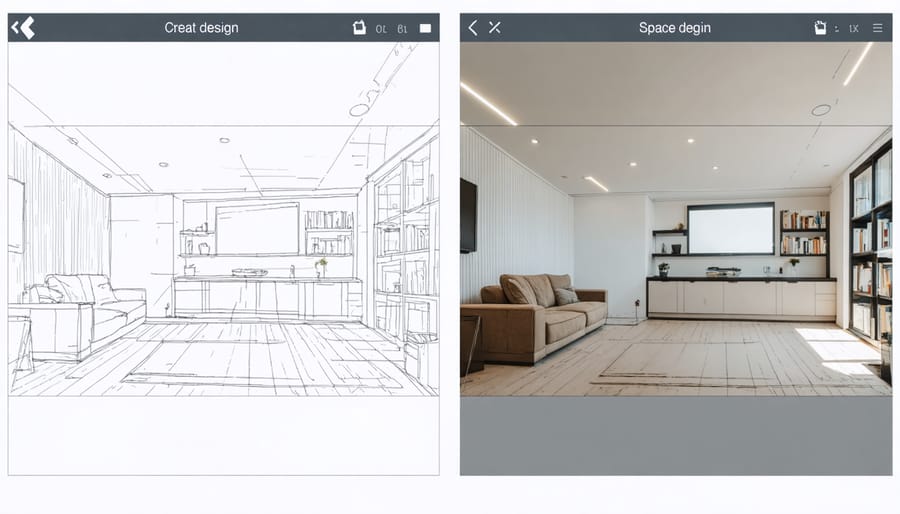
V-Ray for VR
V-Ray stands out as a powerhouse in the virtual reality visualization space, particularly for those seeking photorealistic results in their design projects. What makes it especially valuable is its seamless integration with popular design software like 3ds Max, SketchUp, and Rhino, making it a natural choice for professionals already working with these tools.
The software’s strength lies in its ability to transform standard 3D designs into immersive VR experiences with incredibly realistic lighting, materials, and textures. For interior designers and real estate professionals, this means clients can walk through spaces that look and feel remarkably true to life, complete with accurate natural and artificial lighting conditions that change dynamically as you move through the space.
One of V-Ray’s standout features is its material library, which includes thousands of ready-to-use materials that behave just like their real-world counterparts. Whether you’re showcasing marble countertops, hardwood floors, or custom furniture, the materials respond to light exactly as they would in reality, helping clients make confident decisions about their space.
The workflow is surprisingly straightforward: create your design, apply materials and lighting, and with just a few clicks, export your scene for VR viewing. The software supports major VR headsets, making it easy to present your work to clients. For real estate agents and property developers, this means you can offer virtual property tours that are indistinguishable from physical visits, saving time and resources while impressing potential buyers.
Plus, V-Ray’s render optimization tools ensure your VR experiences run smoothly, even with complex designs, making it a reliable choice for professional presentations.
Implementing VR Software in Your Design Process
Client Presentation Strategies
When presenting VR designs to clients, creating an engaging and professional experience is crucial for success. Start by scheduling virtual design consultations that accommodate your client’s schedule and technical comfort level.
Before the presentation, ensure your VR environment is properly set up and tested. Create a guided tour that highlights key design features and allows clients to naturally explore the space. Consider preparing multiple design variations to demonstrate different options and facilitate decision-making.
Use screen sharing or VR collaboration tools to walk through designs together, even when meeting remotely. Incorporate realistic lighting and textures to help clients visualize the final result. Remember to record sessions when possible, allowing clients to review the designs later and share with other stakeholders.
Make the experience interactive by incorporating annotation tools and real-time modification capabilities. This empowers clients to provide immediate feedback and feel more involved in the design process. Keep presentations focused on the client’s specific needs and objectives, using VR features to address their primary concerns and design requirements.
Finally, follow up with high-quality renderings or recordings from the VR session, helping clients retain the visual impact of your presentation while making their final decisions.

Hardware Requirements and Setup
To get started with virtual reality design software, you’ll need some essential hardware components. At minimum, a VR-ready computer with at least 16GB RAM, a dedicated graphics card (NVIDIA GTX 1660 or better), and an Intel i5/AMD Ryzen 5 processor or higher is recommended. For the best experience, aim for 32GB RAM and a more powerful graphics card like the RTX 3060 or above.
Your choice of VR headset is crucial. Popular options include the Meta Quest 2, HP Reverb G2, or Valve Index. The Meta Quest 2 offers a great balance of affordability and features, while the Valve Index provides premium performance for professionals.
For optimal setup, ensure you have enough clear space – ideally 6.5 x 6.5 feet minimum. Good lighting is essential but avoid direct sunlight on the headset sensors. Consider mounting base stations (if required by your headset) at opposite corners of your workspace, slightly above head height. For design work, having a dedicated workspace with easy access to your computer and controllers will improve productivity.
Optional but helpful accessories include controller grips for extended use and a VR-ready wireless router for untethered experiences.
ROI and Client Benefits
Virtual reality design tools deliver impressive returns on investment by dramatically reducing revision cycles and client misunderstandings. Businesses report up to 40% faster project completion times and a 30% decrease in costly design modifications. These tools enhance project management efficiency while significantly boosting client satisfaction through immersive walkthroughs and real-time design adjustments. Clients can better visualize spaces before construction begins, leading to more confident decision-making and fewer last-minute changes. Additionally, VR presentations give businesses a competitive edge, often resulting in higher project win rates and increased referrals. The initial investment in VR technology typically pays for itself within the first few major projects through saved time and enhanced client relationships.
Virtual reality software has revolutionized how we approach design, visualization, and property planning. From user-friendly platforms like Matterport and Enscape to comprehensive solutions like Unity and Unreal Engine, there’s a VR tool for every need and skill level. By choosing the right software based on your specific requirements, budget, and technical expertise, you can transform your design process and create immersive experiences that wow clients and streamline decision-making.
To get started, consider testing free versions of recommended platforms, joining online communities for support, and gradually expanding your VR toolkit as your needs grow. Remember to prioritize software with good customer support and regular updates. Whether you’re a solo designer or part of a larger team, embracing VR technology today will position you at the forefront of tomorrow’s design landscape.